

rzmota
April 21, 2021

Sort variants alphabetically (ascending/descending)

  • April 21, 2021
  • 49 replies
  • 16334 views

Hi,

Is there any option to automatically sort the items/components in the variants menu? Seems like I can drag them and drop but while having lots of elements it’s quite hard to keep things in the correct order.

I know there are plugins to sort items in the layers menu (like SortIt) but would be great if there is an option to make the same (A->Z, Z->A) for the variants.

It will make life easier.
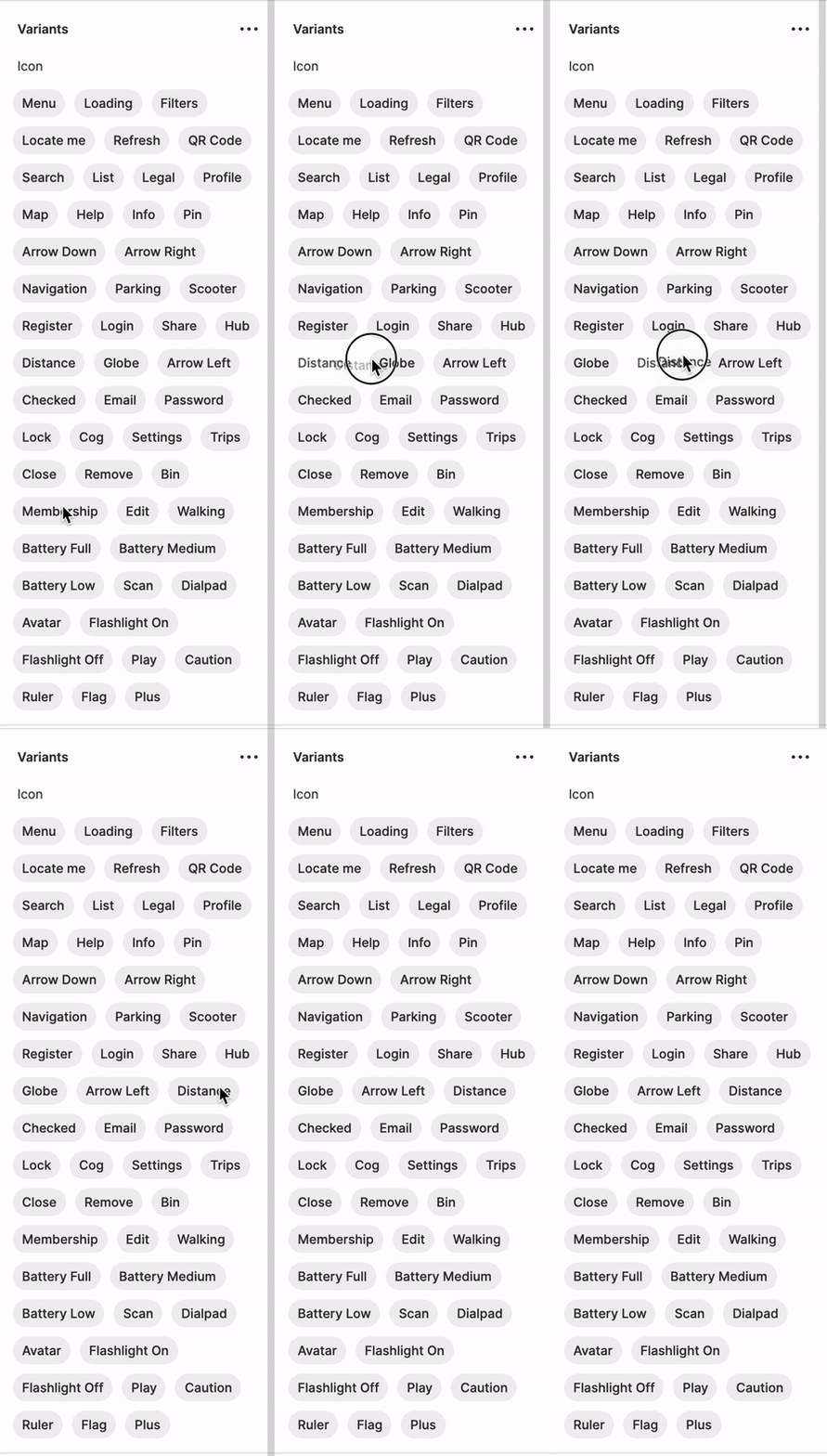
Kapture 2021-04-21 at 13.42.37

49 replies

Luigi_Rossini
November 30, 2021

@rzmota am I wrong or you can solve this problem by dragging the variant name tags in the order you want/need?
This will have an effect on the dropdown list as well.

rzmota
rzmotaAuthor
November 30, 2021

What if you have hundreds or thousands of them? Dragging them around is not the solution.

Ilya_Ivanov
December 1, 2021

Just to be clear on dragging, here is the real-world usecase:

Please note the scrollbar) I use dragging to keep it sorted, true. However, it takes some time to establish the order in an old lib. And this way is not quite reliable, since every contributor has to put any new icon into its place manually on any update, which is annoying and thus ignored in daily routine practice. Autosorting could solve it for real.

Igor_Stetsenko
New Member
December 2, 2021

@Felipe_Moscon, @micah_david.mn, @Ilya_Ivanov, @Luca_Vitiello: good day to everyone.
It seems that I found a solution to how we can sort Figma variants in 2 steps:

  1. Move all variants out of Variants frame.
  2. Once again combine all selected components as variants.

✅ Done. Sorted alphabetically.
And yes, connections checked, links with these master components was not lost after pushing library updates.

Ilya_Ivanov
December 3, 2021

Hello, @Igor_Stetsenko
Thanks for sharing your solution!

I can confirm that it works. However, I’d suggest to use it with caution and create reliable backups beforehand, since there might be some unevident pitfalls. Some notes on my personal experience:

  • You have to put the sorting property to the 1st place.
  • Property names are dropped in some cases (not yet ready to figure out the exact reason right now).
  • Not sure if this is totally safe for usage with REST API and plugins, since a new Variant is probably a new instance/node and thus might have it’s own node_id or some other differences in metadata.

Technically, this is a workaround and it doesn’t completely solve a case on teamwork. However, the idea is smart and helpful anyway. Thank you!

Luigi_Rossini
December 3, 2021

I see your point.
Off topic thought:
about your “real-world” use case, how did you get to such complex set of variants for a component? Do your users understand how to use it?
Just curious 😉

Ilya_Ivanov
December 3, 2021

@Luigi_Rossini

Let’s say, it’s a matter of a project / library structure. In that particular case the Icon component is a wrapper for the whole library of icons that is shared across a bunch of microservices and is syncronized with React-based component system. The amount of icons involved in a particular interface / bundle build varies, but you have to keep them all together to preserve consistency.

Also, there are plenty of variations of a single icon sometimes. For example, when it displays a state or identifies an entity or status:

image
image

Icons are usually used along with captions, colorcodes and a certain area of the layout. The combination is recognizable.

But threre’s even a simplier real-world case. A service supports up to 150+ delivery platforms (YouTube, Spotify, Netfix, Apple Music etc) and uses their logos as icons for report screens, delivery settings and other features. This is a 150+ icon set by default.

Not saying this approach is right or typical, I just state that it exists.

Luigi_Rossini
December 3, 2021

@Ilya_Ivanov
Thanks for sharing!
It’s always interesting to see how others face the complexity of delivering a design system.
I am convinced there’s no good or bad process. The best is the one that enables designers to unlock business value. At the moment, our design system covers four platforms, two web and two natives. We rolled out the platform across twelve countries. Hence we heavily relied on the variants to cover the different use-cases. Despite that, we preferred to implement an essential structure for the most-used components to avoid too much overhead when it comes to an understanding of when to use what. So far, the design community is happy with the library setup, and we’re satisfied with our KPIs.

All the best for your project!

Felipe_Moscon
December 7, 2021

you’re a legend. thank you for sharing it @Igor_Stetsenko . 😉

January 6, 2022

This topic was automatically closed 30 days after the last reply. New replies are no longer allowed.