

mcram
February 1, 2021

Refresh thumbnail

  • February 1, 2021
  • 58 replies
  • 14776 views

I find the thumbnail is slow to update and often doesn’t update for days (at all?). A work around has been to choose “Restore default thumbnail” and then “Set as thumbnail” on the desired frame. The thumbnail has become an important feature to me and I use it to convey information to my team. The inconsistent thumbnail updates are a little problematic.

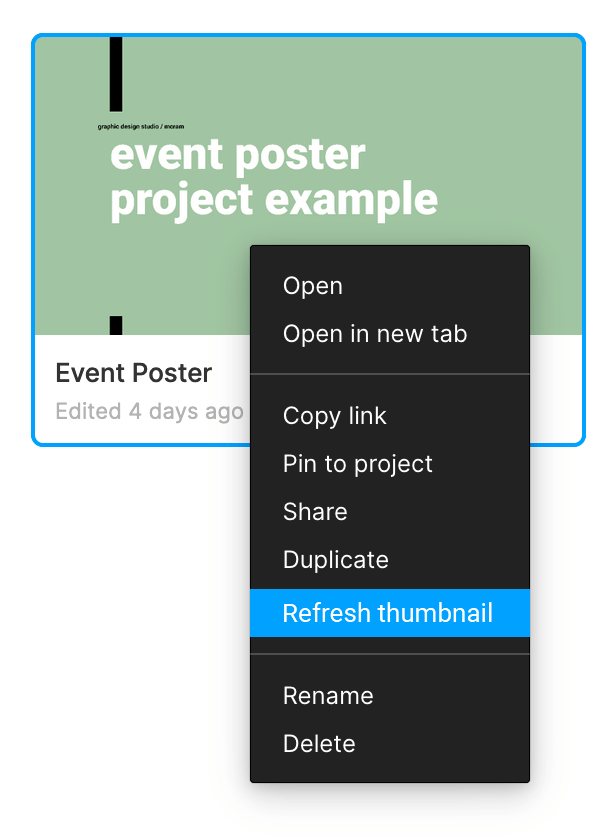
Suggested solution: an option in the right-click menu for the file to “Refresh thumbnail”.
58 replies

Hailey_Williams
October 17, 2021

Same problem here! I’d love an option to right click and refresh the thumbnail. I’ve been experiencing this issue on a regular basis since joining Figma in Feb 2020. The “restore default thumbnail” workaround is my typical go-to, but unfortunately that doesn’t even work 100% of the time.

Prazak_Dawid
October 19, 2021

I disagree with other posters on this a little. For me refresh would be nice but it should just be updated instantly. Typically one thumbnail would be edited at a time so in my view it should just push the update as soon as you exit the screen on which it sits.

Chris_Raymond
October 20, 2021

Ooh, I am loving how you set up your thumbs. What’s the row of icons at the bottom?

Pedro_Batista
New Member
October 22, 2021

Just close and open figma and thumbnail will be refreshed.

Kerwin_Chen
November 1, 2021

Please help to improve this feature.

mcram
mcramAuthor
November 7, 2021

not updating again.

Jean_Bae
November 8, 2021

Yes! This is so annoying. Can Figma team please update this delayed/inconsistent update problem?

We have hundred of files, the thumbnail is key organization and file finding.

Joanna_Charczuk
November 17, 2021

Yes, It’s very annoying. I love Figma but this part is really uncomfortable. Please fix it Figma team!

smallmultiplier
November 17, 2021

This is still annoying and not fixed.

Glen_Campbell
December 1, 2021

+1 Unfortunately, makes this nice feature very frustrating to use