
Critical: Interactive Navigation and Dynamic Transitions in Figma Slide Decks

  • November 5, 2024
  • 3 replies
  • 232 views

Bojan_Ristic

I’m writing to express my deep frustration with the current limitations of Figma’s Slide Deck feature. As a tool celebrated for its UI/UX capabilities, it’s astonishing that Figma lacks fundamental functionalities that are already included in other design platforms.

Key Issues:

  1. Absence of Interactive Buttons for Non-Linear Navigation: The inability to create buttons within slides that link to other slides severely restricts the creation of dynamic, user-driven presentations. This is a basic feature in tools like Canva, which allows for interactive menus and branching scenarios.

  2. Smart Animation for Linked Slides: Once non-linear navigation is added, Smart Animate should apply smoothly across these links to keep animations consistent. This avoids disrupting animations when navigating non-linearly, ensuring a seamless experience.

  3. Enhanced Linking Visualization in Grid View: The Grid View is a great feature, but to avoid the mess of overlapping arrows like in Figma’s Prototype mode, we could add a side panel next to each slide. This panel would display a clear view of which elements link to other slides (see the red arrow in the example).

I’ve attached a simple prototype image to demonstrate how these features could work within Grid View— This is a starting idea, but it could be developed further to make slide linking much clearer.
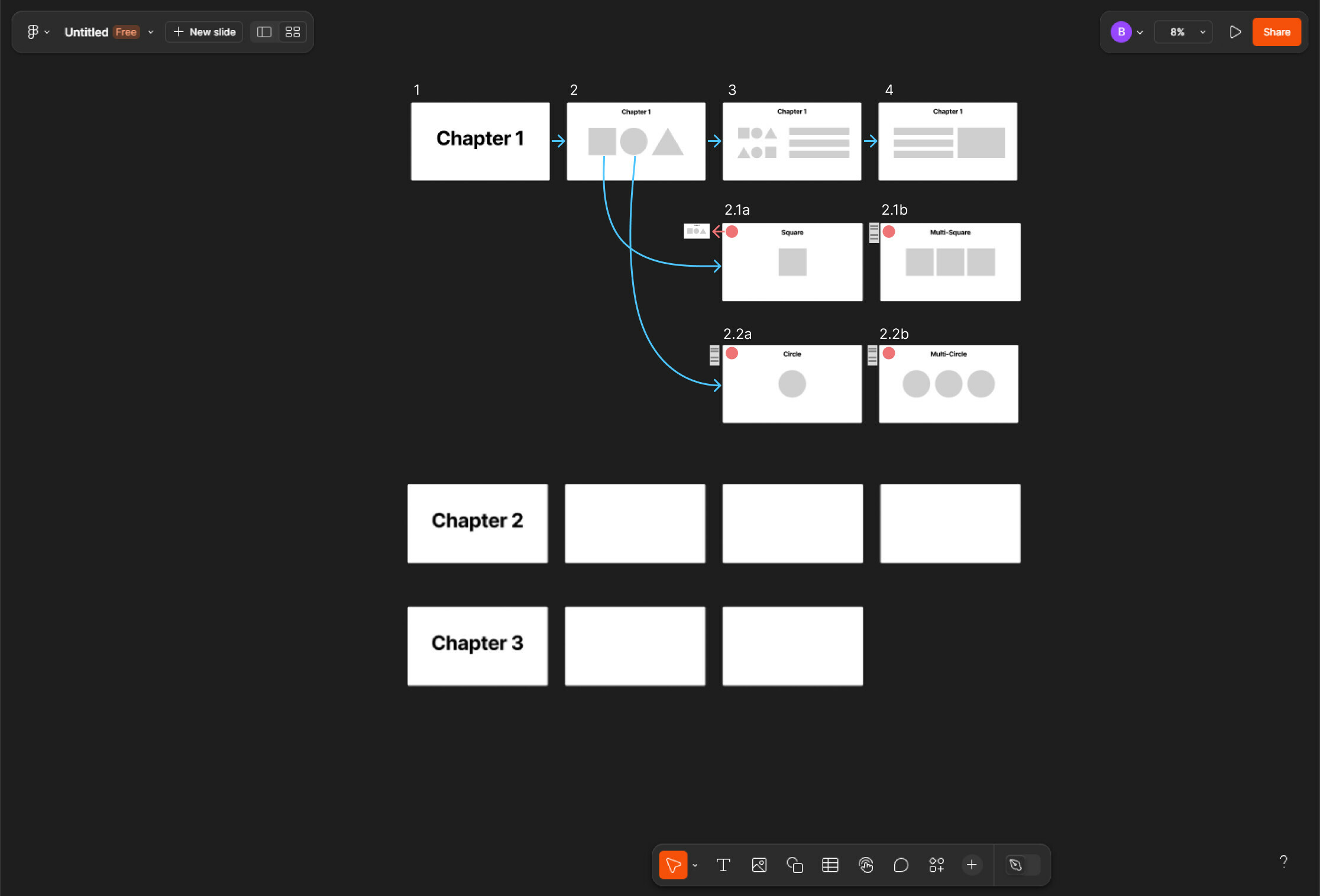
Team Figma, please prioritize these updates to make Slide Deck as powerful, flexible, and user-friendly as your community deserves!

3 replies

khompitoon
  • New Member
  • September 2, 2025

I’m writing to express my deep frustration with the current limitations of Figma’s Slide Deck feature. As a tool celebrated for its UI/UX capabilities, it’s astonishing that Figma lacks fundamental functionalities that are already included in other design platforms.

Key Issues:

  1. Absence of Interactive Buttons for Non-Linear Navigation: The inability to create buttons within slides that link to other slides severely restricts the creation of dynamic, user-driven presentations. This is a basic feature in tools like Canva, which allows for interactive menus and branching scenarios.

  2. Smart Animation for Linked Slides: Once non-linear navigation is added, Smart Animate should apply smoothly across these links to keep animations consistent. This avoids disrupting animations when navigating non-linearly, ensuring a seamless experience.

  3. Enhanced Linking Visualization in Grid View: The Grid View is a great feature, but to avoid the mess of overlapping arrows like in Figma’s Prototype mode, we could add a side panel next to each slide. This panel would display a clear view of which elements link to other slides (see the red arrow in the example).

I’ve attached a simple prototype image to demonstrate how these features could work within Grid View— This is a starting idea, but it could be developed further to make slide linking much clearer.


Team Figma, please prioritize these updates to make Slide Deck as powerful, flexible, and user-friendly as your community deserves!


Margot_Gabel
  • Active Member
  • September 2, 2025

This would be a great improvement for Figma Slides! Keynote is still more interesting for now. 


Christopher Darling

For me, this is the one reason that’s stopped me from using Figma Slides for our deck. Having conditional pathways within the deck is essential sometimes.

Please implement, Figma!