

Daniel12
May 3, 2021
Solved

Keyboard shortcut for Cursor Chat not available

  • May 3, 2021
  • 27 replies
  • 6935 views

1. Describe the bug/issue you’re running into?
On my Swedish layout keyboard I can’t find the “/” to start the Cursor Chat.

2. Are you able to consistently reproduce it? If so what are the steps?

3. Share a screenshot, recording, console log, link to the file, etc.
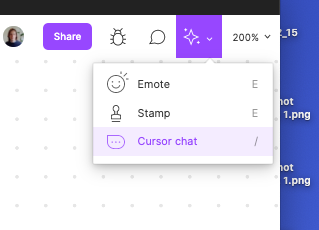
Screenshot 2021-05-03 at 12.26.38

4. Is the issue only happening in desktop app or a specific browser , or both?
Desktop

5. What OS/version and/or browser/version are you using?
Newest Chrome

This topic has been closed for replies.
Best answer by Josh

Hey all thanks for the feedback here. We just launched the International Keyboard Shortcuts beta for German (QWERTZ), Japanese (Kana), and French (AZERTY). Learn more here on how you can participate

This is just the start in working on improving this area, but hope this helps. 🙂

27 replies

Samuele_Marazzita
January 19, 2022

IS there any update @dvaliao ? The issue seems to exist also on Figma Design.

Luis5
New Member
February 21, 2022

No update yet? Using the ✨ menu every time is not a good solution

tiagorangel
March 29, 2022

Yeah, no update yet? Using the right-click menu is not a good option

Marco_Mariella
March 30, 2022

Same for the Italian kb.

tiagorangel
April 2, 2022

Please, there are a lot of users that can’t access the cursor chat with /, and using the menu isn’t a good option at all. This is the same for Figjam & Figma.

djv
Figmate
Community Support
April 4, 2022

Hey All,

Thank you for the additional feedback! We hear you - apologies that we don’t have an updated timeline to provide at this time.

Rest-assured, Figma is continuing to expand internationally and along with that must come multilingual design to reach our international audiences and better support the Figma community around the world. Stay tuned!

Figma
tiagorangel
April 9, 2022

Hey, I discovered that pressing FN + ~ opens the cursor chat! 😀

April 15, 2022

Yeah, what’s going on here? Can’t use the cursor chat without right clicking all the time, which is not really practical 🙂

tiagorangel
April 25, 2022

Check this!

tiagorangel
April 25, 2022

Just hold Fn while pressing “~”