Answer

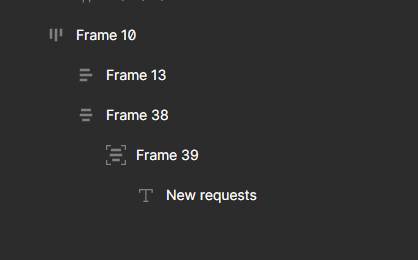
What do the different icons next to the frame mean in the layer overview on the left?
  • November 16, 2023
  • 1 reply
  • 1923 views

image
What is the difference between Frame 10 and 13/38 and the difference between 13/38 and 39?
What do the icons mean?

Best answer by djv

Hey @Manuel13, thanks for reaching out!

The icons refer to the Auto layout applied to each frame.

Frame 10 is likely a horizontal layout aligned to the top. Frame 13 is likely a vertical layout aligned to the left. Frame 38 is likely a vertical layout center-aligned, and Frame 39 is likely a vertical layout center-aligned with absolute position applied as well.

This topic has been closed for replies.

1 reply

djv
Figmate
  • Community Support
  • Answer
  • November 16, 2023

Hey @Manuel13, thanks for reaching out!

The icons refer to the Auto layout applied to each frame.

Frame 10 is likely a horizontal layout aligned to the top. Frame 13 is likely a vertical layout aligned to the left. Frame 38 is likely a vertical layout center-aligned, and Frame 39 is likely a vertical layout center-aligned with absolute position applied as well.
