
Solved

Shortcuts for send to back/front on German QWERTZ

  • October 12, 2023
  • 3 replies
  • 489 views

I’m having trouble finding shortcuts for sending objects to back/front on a German QWERTZ keyboard (Mac). In the menu these shortcuts are listed, but none of them actually work. Can anyone help me with that please?
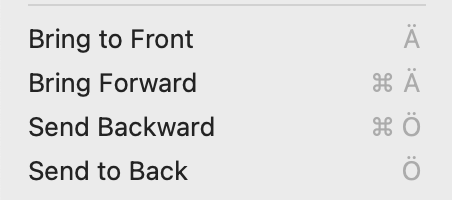
Screenshot 2023-10-12 at 16.51.06

Best answer by Celine_

Hi Ana184,
Thank you for flagging this! Hmm it seems odd, I can’t replicate on my end. Can you make sure you have changed the keyboard layout to German QUERTZ in the Figma preferences? Here the steps to change in our help center article : https://help.figma.com/hc/en-us/articles/5665442977431-Select-keyboard-layout#select-keyboard

This topic has been closed for replies.

3 replies

Celine_
Figmate
  • Community Support
  • Answer
  • October 18, 2023

Hi Ana184,
Thank you for flagging this! Hmm it seems odd, I can’t replicate on my end. Can you make sure you have changed the keyboard layout to German QUERTZ in the Figma preferences? Here the steps to change in our help center article : https://help.figma.com/hc/en-us/articles/5665442977431-Select-keyboard-layout#select-keyboard


  • Author
  • October 20, 2023

Thank you, I didn’t even know there was a way to change it! Everything is working fine now!


Celine_
Figmate
  • Community Support
  • October 24, 2023

Great, it’s working now! Thank you for confirming 😊