

Viktors
New Participant
March 1, 2024
Solved

Is there any button for retry Figma license payment?

  • March 1, 2024
  • 2 replies
  • 442 views

Is there a way to retry a failed Figma payment without waiting for the next business day or changing my payment method? My payment failed because there wasn’t enough money in my account at the time. I was wondering if there’s a “Retry Payment” option available for manually forcing the payment to go through.

This topic has been closed for replies.
Best answer by Celine_

Hey Viktors!
Thank you for reaching out about this, and apologies for any difficulties!

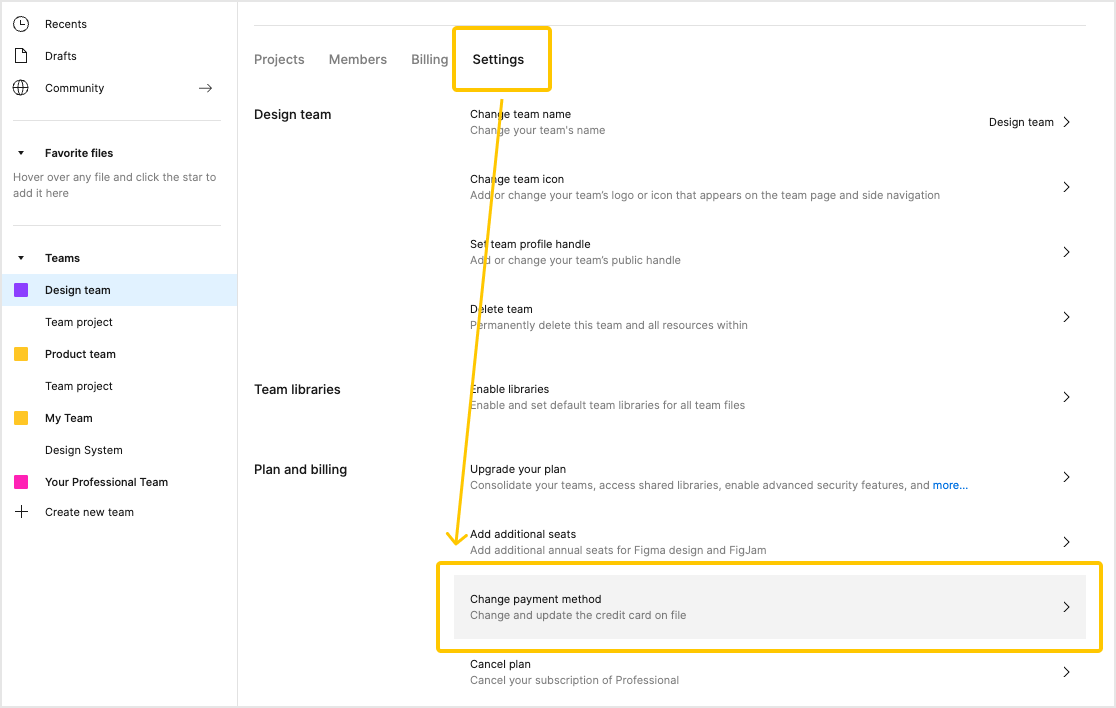
There is no retry payment button. As a workaround, you can retry a payment at any time by using ‘Change payment method’ from your team’s Settings tab and re-entering your card details (existing or new). This will trigger a payment attempt for any failed payment.

You can see more details about what happens when a payment fails in our Help Center: Failed payments


Hope this helps!

2 replies

Celine_
Figmate
Celine_Solution
Community Support
March 4, 2024

Hey Viktors!
Thank you for reaching out about this, and apologies for any difficulties!

There is no retry payment button. As a workaround, you can retry a payment at any time by using ‘Change payment method’ from your team’s Settings tab and re-entering your card details (existing or new). This will trigger a payment attempt for any failed payment.

You can see more details about what happens when a payment fails in our Help Center: Failed payments


Hope this helps!

Fredrick_Isaac
November 12, 2024

Hey, I love FIGMA and been using it ever since, but the payment is frankly a bit of a headache as sometimes the account is overdrawn (possibly by other subscriptions someone has) and it would REALLY helpful if there was a Retry Payment button as a quick remedy for this.
Also, the “work around” you have offered above doesn’t even work for me as my settings menu tab doesn’t even have the “Change Payment Method”.
Please add this feature…