Answer

Is there a way to auto layout and/or ungroup auto layouts so the list items don't get reordered?

  • February 21, 2024
  • 2 replies
  • 265 views

Attila_Bodi1

Screen Recording 2024-02-21 at 4.11.36 PM|video

Best answer by djv

Sorry for the oversight!

There is no current way to change the Shift+A behavior that defaults to Last on top and reorders the items, but as a workaround, you can:

  • Create an empty frame and add Auto Layout
  • Change that frame’s canvas stacking setting to First on top
  • Drag the elements into the AL frame
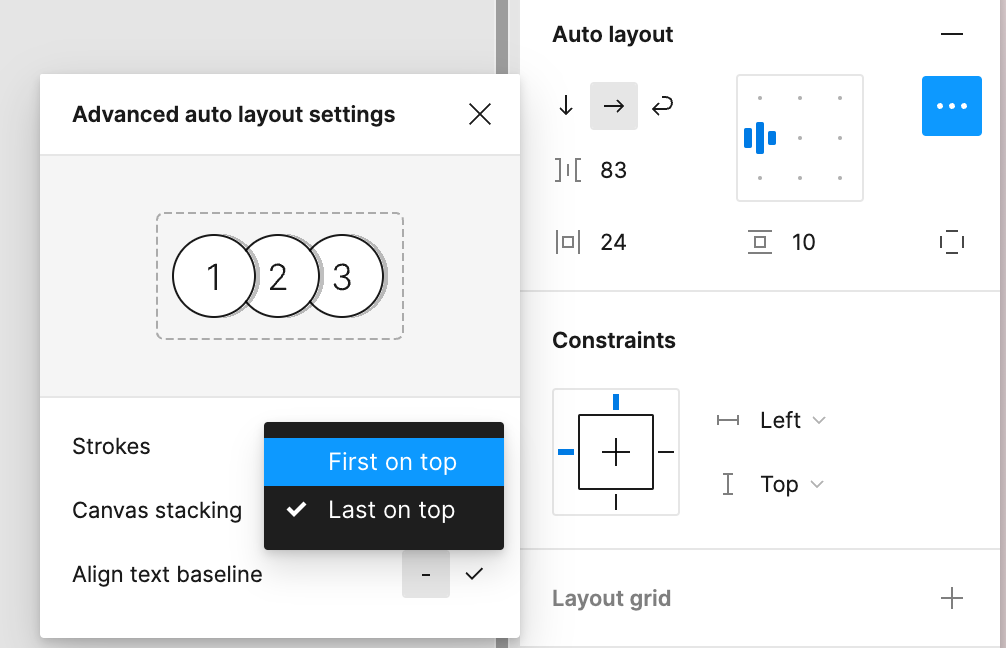
This topic has been closed for replies.

2 replies

Attila_Bodi1

This isn’t addressing the issue. Your talking about overlapping of stacking layers. I’m talking about reordering layers when they are grouped and ungrouped.


djv
Figmate
  • Community Support
  • Answer
  • February 23, 2024

Sorry for the oversight!

There is no current way to change the Shift+A behavior that defaults to Last on top and reorders the items, but as a workaround, you can:

  • Create an empty frame and add Auto Layout
  • Change that frame’s canvas stacking setting to First on top
  • Drag the elements into the AL frame