Anais_Moisy
January 25, 2024
Question

Is it possible to change a component state after clicking on another component?

  • January 25, 2024
  • 22 replies
  • 17898 views

Hi,

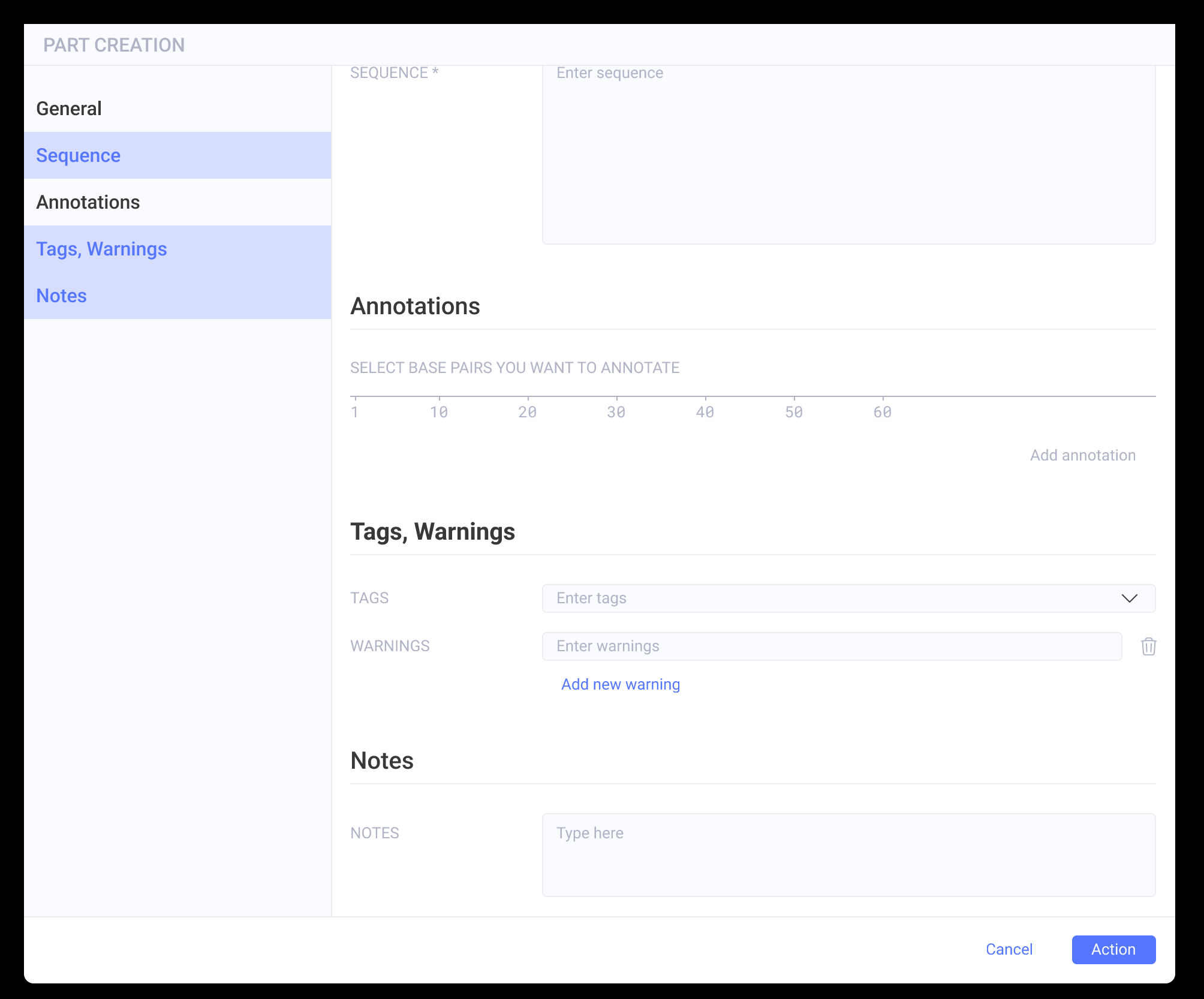
I have a side panel with buttons, and when clicking on one of the categories, the main screen slides to the correct categories. This works great.

The buttons are in variant components with three states (default, hover, and selected).

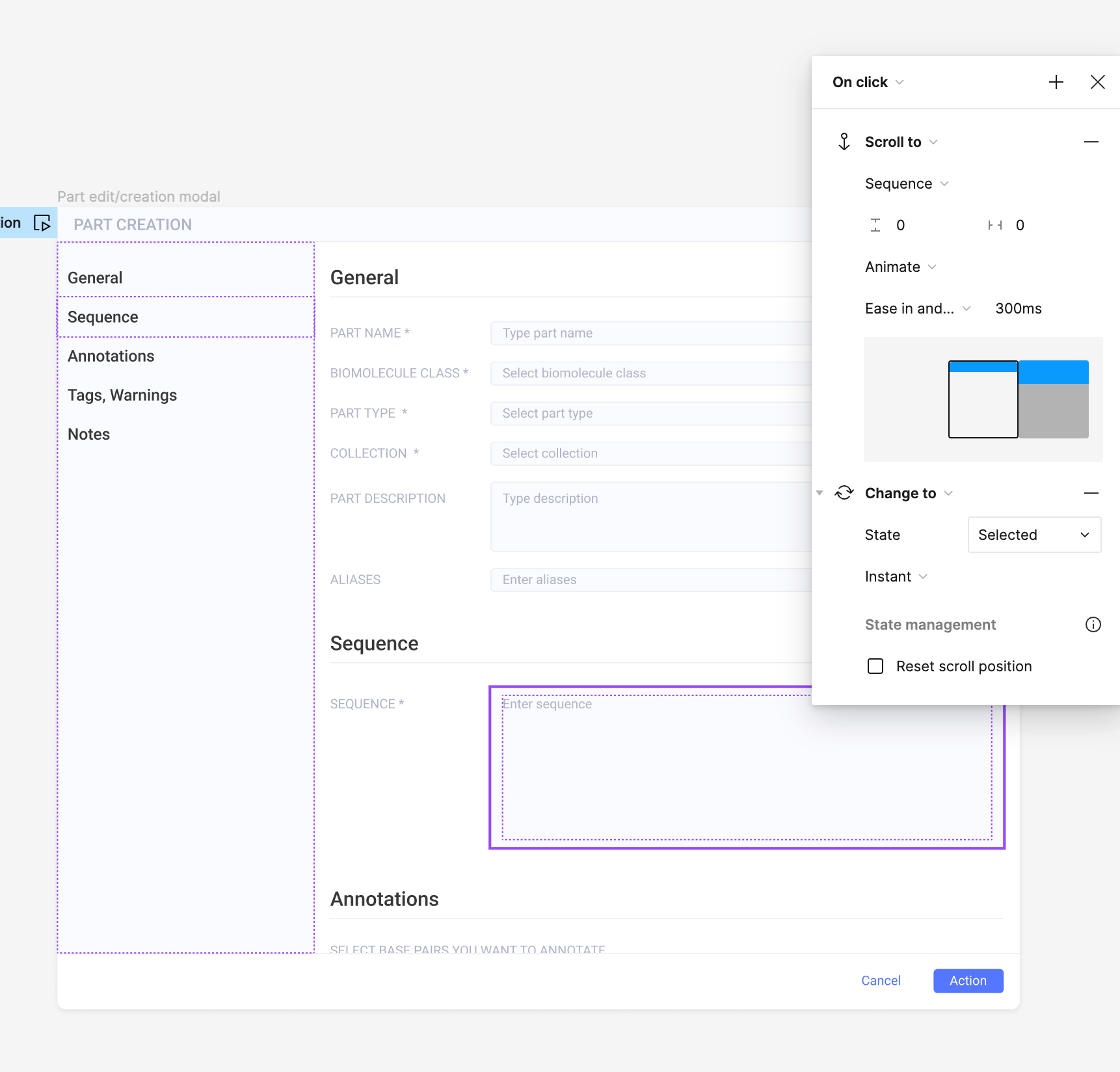
When I click on the button, I have two interactions set up in the prototype:

  • ‘scroll to’ (to scroll to the section)
  • ‘change to’ : state = selected

My issue is that I want the button to go back to the default state when I click on another one. Is there a way to do that? (for now, they all become selected when I click one after the other).

Thank you in advance,
Anaïs
This topic has been closed for replies.

22 replies

y_toku
Figmate
Community Support
January 26, 2024

Hi there,

Thanks for reaching out. Based on what I gather, you may need to use different frames to achieve your desired outcome. I’ve been experimenting further with this playground to see what’s possible: https://www.figma.com/community/file/1033456279024883078

Could you share your file link? I’d like to have a closer look to better understand your needs.

I might have overlooked something, so it would also be interesting to see the community’s feedback.

Thanks,
Toku

Anais_Moisy
January 26, 2024

Hi y_toku

Thank you for getting back to me.
Here is the figma file

If you look at the modal in preview mode, when you click on the categories on the side, you scroll to the appropriate section, but when you click on another one, the previous one is still in the ‘selected’ mode. So if I click on all the menus, they are all selected, while I would like to have only one selected at a time.

Let me know if there is a setting I haven’t set up correctly or if you have any advice.

Many thanks,
Anaïs

y_toku
Figmate
Community Support
January 30, 2024

Hey @Anais_Moisy thanks for sharing! Could we get a view access for the file please?

Anais_Moisy
January 30, 2024

Sorry @y_toku . I just did. You should have access now.

Viktors
New Participant
March 10, 2024

Hi, I am in the same situation. I need to create two interactions on the click trigger. One should change the status to active and “scroll to” content. At the same time, only one clicked option must be shown as active.

Shaul_Vainblat
March 12, 2024

You can use variables to achieve a component state change, it’s great for use cases when the click changes a different component state.

Create variables for all your states and one variable to apply the states, this variable will be applied on instance component state dropdown.

June 27, 2024

Hi, I am facing a similar issue. I have created a button component Default and Pressed state. I put this button on page 1 and 2 of my prototype. On page 1, I press on this button and the button change from default to pressed state. On page 2, I want the same button to be in default state, but it is still in pressed state.

What can I do please?

y_toku
Figmate
Community Support
July 9, 2024

Have you tried resetting the component state? You can find more information here:

Figma Learn - Help Center

If that doesn’t work, could you provide a bit more detail on what you’re trying to achieve?

Thanks,
Toku

Lamb_Robert_Westlake
August 7, 2024

Can you share a video or example. I understand the basics about variables. Use them for color and spacing, but not states and prototypes yet. This is what I’ve been searching for.

Julie_Cochran
New Member
August 21, 2024

Echoing this. I really need an example of how to use variables to turn states on and off in variants. Specifically, I am creating a prototype where I have a nav bar with nav items that have a static, hover, and pressed state. When someone navigates away from the section, I want the pressed state to turn off, but I can’t figure out how to do this.