

Sorosh_Azizi
January 23, 2024
Question

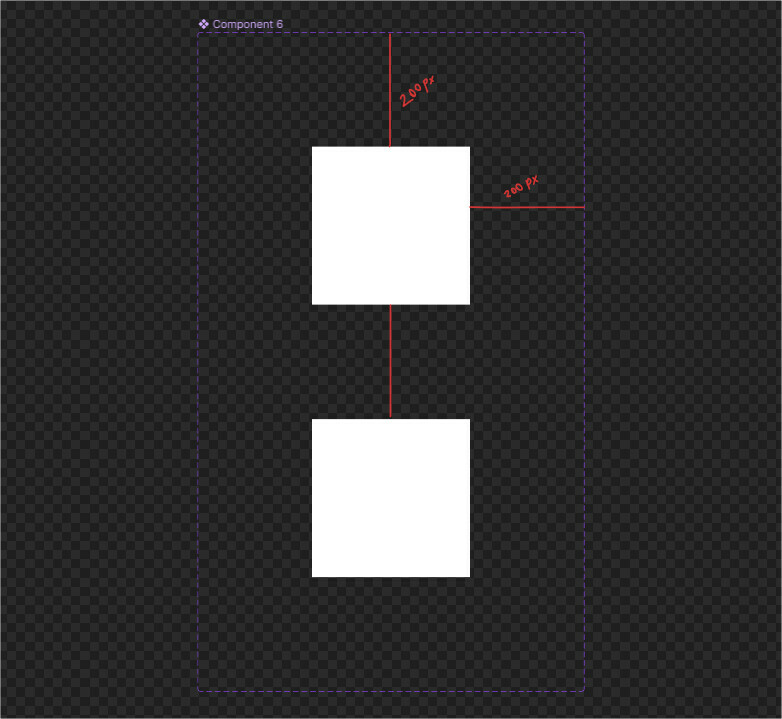
Component set boxes are so huge as default!

  • January 23, 2024
  • 3 replies
  • 261 views

HI there !

When i want to add variant to a component or want to create a component set, padding of the box is 200 px 😐
i try to set as default setting in edit menu but it doesn’t work for component set size and every time i add a variant to component set everything changes like pic blow.

any solution?
This topic has been closed for replies.

3 replies

y_toku
Figmate
Community Support
January 24, 2024

Hi there,

Thank you for your post. I’m unsure why the default padding size was set to 200px. However, have you considered implementing auto layout for the component set? This approach would give you greater control over the set.

I’m also open to other suggestions! If you have any questions or need further clarification, please don’t hesitate to ask.

Thanks,
Toku

Karim_Lounes
New Member
January 22, 2025

Hi. I have the same issue. When creating a component, the default vertical gab is 50, the default paddings are 100. These values are hidden since I can only see them once I create an autolayout.

I remember a few months ago, I attended a Figma webinar and they “very quickly” showed a fast short cut to change those using a mouse wheel scroll while holding on some key.

I cannot seem to find the way to reset those values back to 10px or 12px so I don’t have to manually change them every time I create a component. It’s become truly an annoyance at this point.

Thanks

Nellya
Power Member
January 22, 2025

@Karim_Lounes padding is a doubled nudge amount size