

olayinkapinmo
October 27, 2023
Solved

Change on click state to default

  • October 27, 2023
  • 2 replies
  • 1730 views

Hello there,
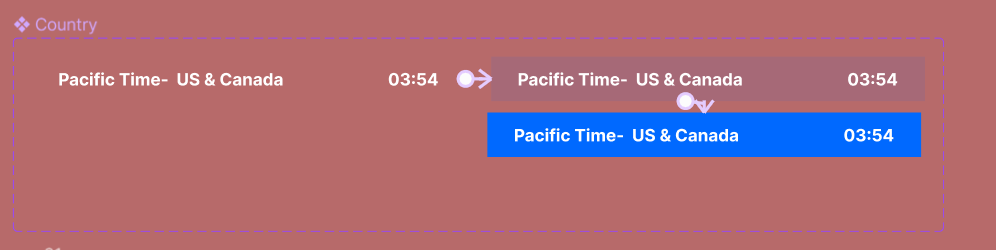
I am currently working on a drop-down menu that has both hover and click triggers. Everything else works fine except I would like the previously clicked component to change back to its normal state once I click on another component in the drop-down.

This topic has been closed for replies.
Best answer by Nate_G

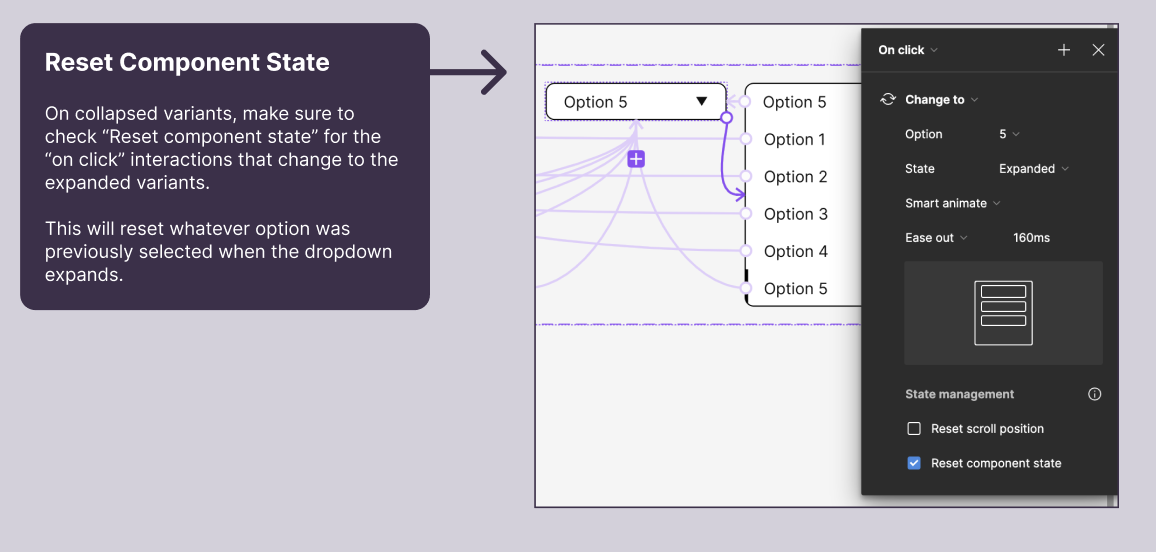
@olayinkapinmo Make sure to check “Reset Component State” when you go between the collapsed and expanded states of your dropdown.

I created an example file and prototype a while back on one way to set up a dropdown with selected states.

2 replies

Nate_G
Nate_GAnswer
Power Member
October 27, 2023

@olayinkapinmo Make sure to check “Reset Component State” when you go between the collapsed and expanded states of your dropdown.

I created an example file and prototype a while back on one way to set up a dropdown with selected states.

Nate G
olayinkapinmo
October 27, 2023

Thank you. Works perfectly