
Question

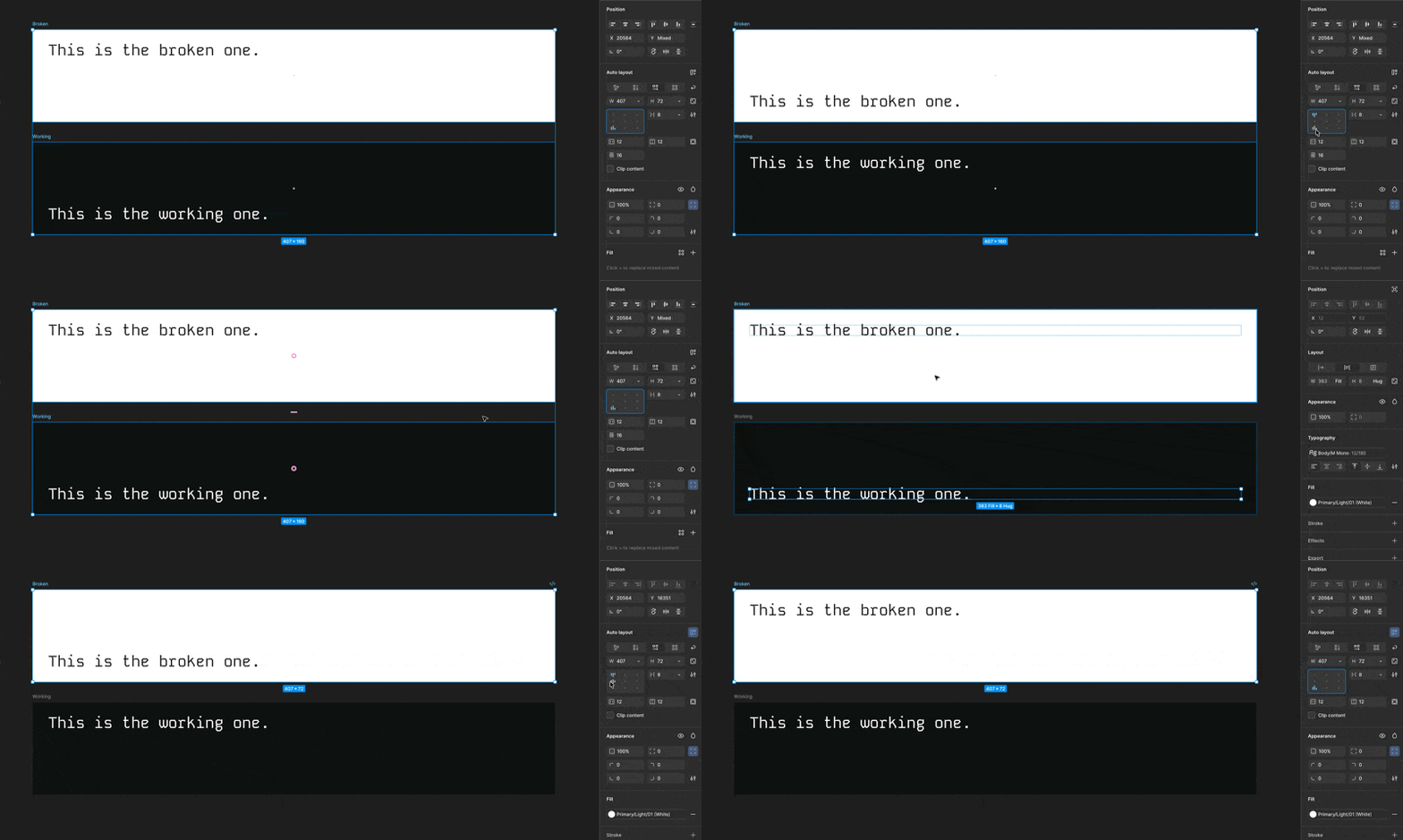
Auto Layout is entirely broken on latest update...

  • May 29, 2026
  • 3 replies
  • 64 views

Alec_Douglas

It happens at random, but at some point the controls for auto layout get switched. This happens both with the alignment selection and the padding so far from what i’ve experienced. The only way to fix is to remove the parent frame entirely with auto layout, re-frame and re-apply auto layout settings.


Dear Figma devs, how about we stop vibe coding everything and run some QA on the most basic features before pushing an update. 🙃


And no, I do not have anything flipped or inverse before applying the auto layout to the frame.

Figma Version: 126.4.11

Here’s the file: 


3 replies

Tom Reem
Figmate
  • Figmate
  • May 30, 2026

Hey ​@Alec_Douglas — welcome to Figma Forum, and thanks for the detailed report and GIF. That's really helpful.

I tested this on my end within the Figma Desktop App (126.4.11) and haven't been able to reproduce the switching yet, which is why getting into your file will be key. I've opened a ticket on your behalf with our Technical Quality team — your case number is: 1935222. Please check your inbox for an email from me with next steps on sharing file access securely.

We're also keeping an eye out for similar reports. If anything comes up that sheds more light on this, I'll follow up here.


Alec_Douglas
  • Author
  • New Member
  • June 1, 2026

Hey ​@Alec_Douglas — welcome to Figma Forum, and thanks for the detailed report and GIF. That's really helpful.

I tested this on my end within the Figma Desktop App (126.4.11) and haven't been able to reproduce the switching yet, which is why getting into your file will be key. I've opened a ticket on your behalf with our Technical Quality team — your case number is: 1935222. Please check your inbox for an email from me with next steps on sharing file access securely.

We're also keeping an eye out for similar reports. If anything comes up that sheds more light on this, I'll follow up here.


@Tom Reem did the file I attach not work to see the issue?


Tom Reem
Figmate
  • Figmate
  • June 7, 2026

Hi ​@Alec_Douglas — I touched base with the Technical Quality team and, after looking more closely at the file you attached, we can see the broken frame's y-axis transform is set to -1. This can sometimes happen without an obvious trigger and is likely what's inverting the auto layout controls.

To fix it in this case:

  1. Select the broken frame → click Flip vertical.
  2. Select the nested text → click Flip vertical.
  3. Adjust your auto layout alignment and it should behave as expected from there.

Thanks for your patience as we followed up. Please check your inbox for more detail, and let us know if this does the trick. 🙏🏻