

Question

Token Inheritance/Overrides from Parent Component when swapping specific Instances

  • April 16, 2026
  • 1 reply
  • 15 views

jjortanez

Hello,


I’m running into issues with swapped instances inheriting tokens from the parent-level component. 

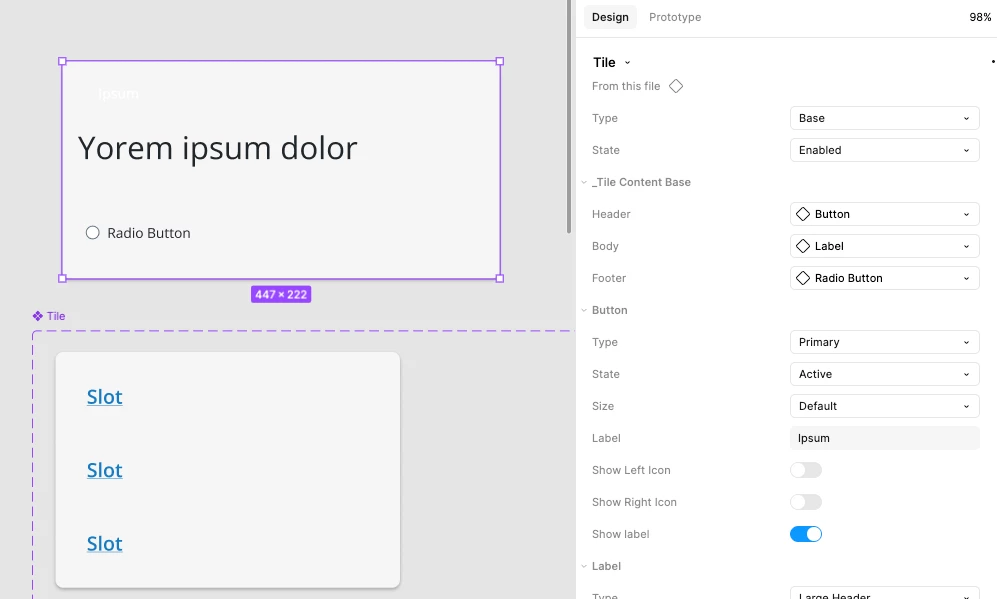
For example, our team is using our own slots (to avoid backwards compatibility bc Figma slots breaks our slots) and when I switch the slot instance with a button, the button inherits the empty tokens  instead of its default tokens. 


This only occurs for the button components - for some reason, the inheritance/override doesn’t happen to our other components.

In the example below, the Tile component has 3 slots stacked vertically. The Tile instance above replaces the slots with: Button, Label, and Radio Button components. The button component should have a green background, but it inherits the “empty” token from the Slot. 
 

1 reply

djv
Figmate
  • Community Support
  • April 22, 2026

Hi ​@jjortanez, thanks for reaching out!

I can see how that behavior would feel confusing. What you’re running into is expected due to how Figma handles instance swaps. When a nested instance is swapped, Figma treats it as a full replacement, so the new instance resets to its own default properties rather than inheriting tokens or overrides from the original placeholder in the parent component.
 

Here are a few ways to make this more predictable:

  • Match internal layer names: If you want properties like color or size to carry over (common with icons), the layer names inside each component need to match exactly.
  • Use instance swap properties: Exposing the nested instance on the parent makes swapping more controlled and avoids digging into layers.
  • Reset overrides when needed: If something looks off after a swap, resetting the instance can restore the intended defaults.
  • Be mindful with slots: Variables applied to a placeholder won’t automatically transfer to whatever component gets swapped in.

Hope this helps explain!